Delta Lake
Writes records as Parquet files to a Delta table in S3, or a store that speaks its API, and
commits them as the next entry of the table's _delta_log. The table is reached by
its location, or by its name in Databricks Unity Catalog. Each commit is a version of the table.
Example
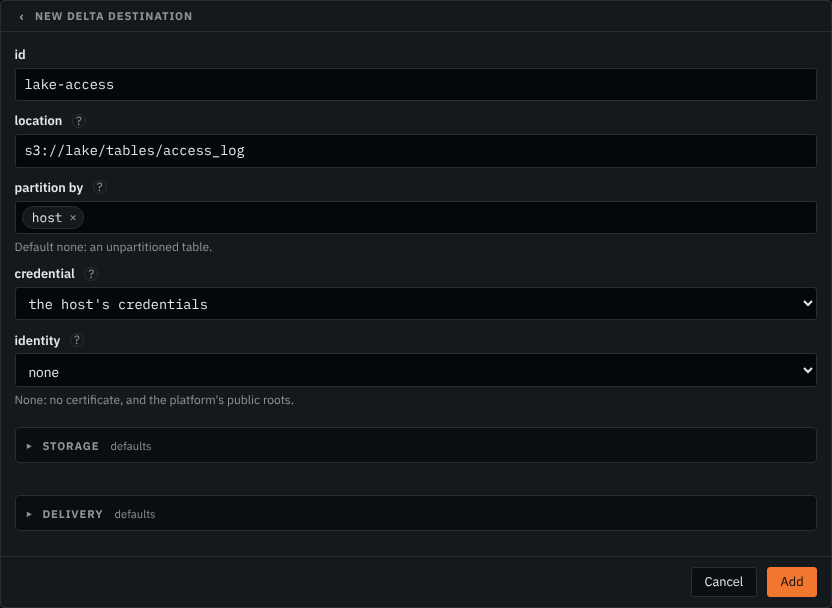
Writes the table at s3://lake/tables/access_log with the worker host's AWS
credentials, and partitions it by host when it creates it.
{
"id": "lake-access",
"type": "delta",
"location": "s3://lake/tables/access_log",
"partitionBy": [
"host"
]
}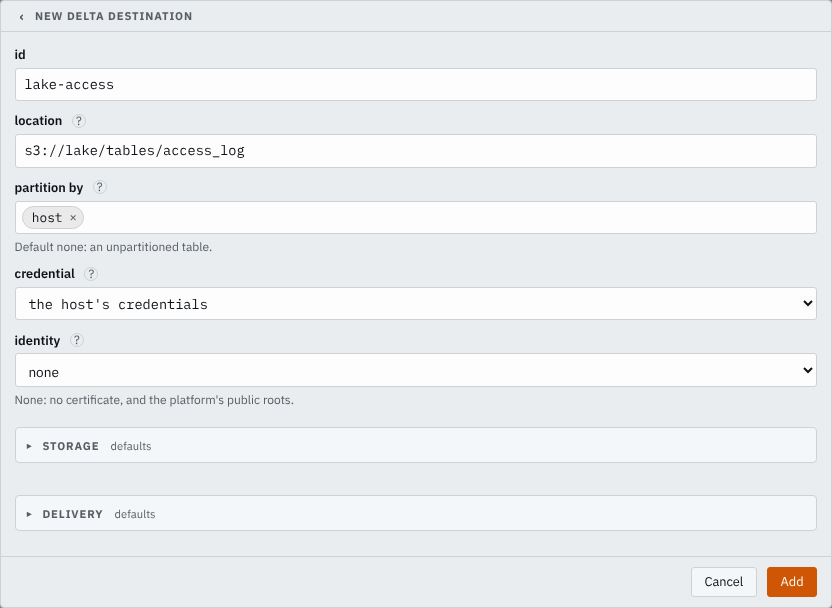 Open complete screenshot ↗
 Open complete screenshot ↗
 Writes the same table in a MinIO bucket, signed with the access key in the worker-host variables MINIO_ACCESS_KEY and MINIO_SECRET_KEY.
{
  "id": "lake-access",
  "type": "delta",
  "location": "s3://lake/tables/access_log",
  "endpoint": "https://minio.example.com:9000",
  "accessKeyId": "MINIO_ACCESS_KEY",
  "secretAccessKey": "MINIO_SECRET_KEY"
}
Before you start
- Have a bucket in S3, or in a store that speaks its API, including conditional writes: a write
with
If-None-Match: *must succeed only when no object is at its key. - The table is the one at
location, and the destination creates a missing one there. Or it is the external tableunityCatalognames, which must exist: see Unity Catalog. A table that Unity Catalog manages is not written. - A table that exists is one this writer can append to:
- its protocol needs reader version 3 or lower and writer version 7 or lower, and each
writer feature it names is one of
appendOnly,invariants,checkConstraints,changeDataFeed,columnMapping,v2Checkpoint,domainMetadata,deletionVectors,vacuumProtocolCheckandtimestampNtz; - its files are Parquet;
- it maps columns by name, with
delta.columnMapping.maxColumnIdset, or not at all; - it sets no check constraint;
- no column is generated, an identity, has a default or carries an invariant, and every column is nullable, as is every array's element;
- it has a column a data file can hold, one that is not
voidalone; - its checkpoints keep file statistics as JSON:
delta.checkpoint.writeStatsAsJsonis notfalseanddelta.checkpoint.writeStatsAsStructis nottrue; - it is partitioned by columns of type
boolean,byte,short,integer,long,double,date,timestamporstring.
- its protocol needs reader version 3 or lower and writer version 7 or lower, and each
writer feature it names is one of
- Give whatever signs for storage the permissions Storage permissions lists: the access key or role the destination names, else the worker host's AWS credentials. Through Unity Catalog, the credentials it vends must carry them.
- Send this destination records of one type: the routes writing to it write the same record, which is the table's schema. See Columns.
Settings
It also takes the settings every destination takes.
location string default the table unityCatalog names
The table's root in S3, s3://bucket/path. A missing table is created there from the route's record. Exactly one of location and unityCatalog.
s3://lake/tables/webs3://acme-logs/delta/firewallunityCatalog object default the table at location
A Databricks Unity Catalog external table, in place of location: workspace is the workspace's https:// address, table its three-part name, catalog.schema.table, and clientId and clientSecret the OAuth client credentials of the service principal it signs in as. Unity Catalog gives the table's root and the credentials for its storage, so no access key or role is set beside it.
{"workspace": "https://dbc-1234abcd-5678.cloud.databricks.com","table": "main.logs.web","clientId": "6f1c2a3b-0d4e-4f5a-9b8c-7d6e5f4a3b2c","clientSecret": "DATABRICKS_CLIENT_SECRET"}{"workspace": "https://dbc-1234abcd-5678.cloud.databricks.com","table": "security.firewall.events","clientId": "6f1c2a3b-0d4e-4f5a-9b8c-7d6e5f4a3b2c","clientSecret": {"secret": "databricks-client","version": 1}}partitionBy list of strings default none, an unpartitioned table
The top-level columns a table it creates is partitioned by. A table that exists keeps its own.
hostdthostaccessKeyId credential default the host's credentials
The credential holding the access key's id. Set both accessKeyId and secretAccessKey, or neither.
AWS_ACCESS_KEY_ID{"secret": "aws-access-key-id","version": 1}secretAccessKey credential default the host's credentials
The credential holding the access key's secret.
AWS_SECRET_ACCESS_KEY{"secret": "aws-secret-access-key","version": 1}identity identity default none
The connection identity it connects to the store under, for a private CA or a client certificate.
store-clientcorp-proxyAdvanced: Storage
region string default the host's, else us-east-1
The bucket's region.
us-east-2eu-west-1ap-southeast-2endpoint string default the host's, else AWS
An S3-compatible service's address. Without an access key, the worker host's AWS settings, such as AWS_ENDPOINT_URL, come first.
https://minio.example.com:9000https://10.0.8.20:9000roleArn string default none
A role to assume, for a bucket in another account.
arn:aws:iam::111122223333:role/smeltr-writerarn:aws:iam::111122223333:role/service-role/smeltr-writerexternalId string default none
The external id the role requires. Only with roleArn.
smeltracme-7f3c2aauthEndpoint string default the region's own
Where the role in roleArn is assumed. Only with roleArn.
https://sts.us-east-2.amazonaws.comhttps://sts-fips.us-east-1.amazonaws.comAdvanced: Delivery
compression string default zstd
How each Parquet file compresses its columns.
none- Writes columns uncompressed.
gzip- Compresses columns with gzip.
snappy- Compresses columns with Snappy.
lz4- Compresses columns with LZ4.
zstd- Compresses columns with Zstandard.
inFlight integer default 4
How many parts of one file upload at once. 1 to 64.
812maxObjectBytes size default 64 MiB
The largest data file it writes, compressed. 64 KiB to 64 GiB.
256 MiB512 MiBbufferBytes size default 256 MiB
Memory it may use on each worker for records not yet committed. Files are committed early when it fills. 4 MiB to 32 TiB.
1 GiB4 GiBstallAfterSecs integer default 30
Seconds one call to the store, or one commit, may take before it counts as stalled. 1 to 120.
60120fileIntervalSecs integer default 60
The longest records wait, in seconds, before they are committed to the table. Each commit is an entry of the table's log; records are acknowledged only once committed, so a source is held open up to this long. 5 to 240.
30240Storage permissions
Whatever signs for storage needs, under the table's location:
s3:ListBucketon the table's_delta_log/;s3:GetObject,s3:PutObjectands3:DeleteObject;s3:AbortMultipartUpload.
A policy for the table in the example:
{
  "Version": "2012-10-17",
  "Statement": [
    {
      "Effect": "Allow",
      "Action": [
        "s3:ListBucket"
      ],
      "Resource": "arn:aws:s3:::lake",
      "Condition": {
        "StringLike": {
          "s3:prefix": "tables/access_log/_delta_log/*"
        }
      }
    },
    {
      "Effect": "Allow",
      "Action": [
        "s3:GetObject",
        "s3:PutObject",
        "s3:DeleteObject",
        "s3:AbortMultipartUpload"
      ],
      "Resource": "arn:aws:s3:::lake/tables/access_log/*"
    }
  ]
}
With roleArn, the role carries this policy and the credentials the destination
starts from may assume it.
Unity Catalog
A Delta table registered in Databricks Unity Catalog is named by unityCatalog, in
place of location. The destination signs in to the workspace as a service
principal, takes the table's location and storage credentials from Unity Catalog, and renews the
credentials before they expire, so it holds no AWS credentials of its own. The table is an
external Delta table in S3, and it must exist. Everything after that is as for a table named by location.
Writes the external table main.logs.web, signed in to its workspace as the service
principal whose OAuth secret is in the worker-host variable DATABRICKS_CLIENT_SECRET. The table's bucket is in us-west-2.
{
  "id": "lake-web",
  "type": "delta",
  "unityCatalog": {
    "workspace": "https://dbc-1234abcd-5678.cloud.databricks.com",
    "table": "main.logs.web",
    "clientId": "6f1c2a3b-0d4e-4f5a-9b8c-7d6e5f4a3b2c",
    "clientSecret": "DATABRICKS_CLIENT_SECRET"
  },
  "region": "us-west-2"
}
Set up Databricks
Create the service principal and its OAuth secret as Databricks' OAuth machine-to-machine authentication describes, and give it access to the table as credential vending for external system access describes. Then:
workspaceis the workspace's URL;tableis the table's name,catalog.schema.table;clientIdis the service principal's client id;clientSecretis the credential holding its OAuth secret;region, besideunityCatalog, is the region of the table's bucket.
What is refused
The configuration is refused when a Delta destination:
- names both
locationandunityCatalog, or neither; - gives a
workspacethat is not anhttps://address with nothing after its host, or anhttp://one off this host; - names a
tablethat is not three parts,catalog.schema.table; - names no
clientId; - names no
regionbesideunityCatalog; - names
accessKeyId,secretAccessKey,roleArnorauthEndpointbesideunityCatalog: the destination takes its storage credentials from Unity Catalog.
The destination refuses to start on a table that is not Delta, not external, or not in S3, and on one reached through a multi-region access point.
Columns
The table's schema is the record the routes write here, its fields the table's columns, nested
fields as structs and arrays as arrays. A missing table is created with that schema, as a plain
Delta table, with partitionBy as its partition columns. A table that exists keeps
its columns and its partitioning: a field it lacks, at any depth, is added as a nullable column
before any file is written, and a column the record lacks reads as null in the rows written. A
field that can hold no value, null or a list or closed struct of nothing else, has no column. Each field is
written as the Delta type of its record type:
| Record type | Delta type |
|---|---|
bool | boolean |
i64 | long |
duration | long, its count of microseconds |
f64 | double |
str | string |
variant | string, the value as JSON |
datetime | timestamp, in UTC |
bytes | binary |
array<T> | array |
{name: T, ...} | struct; an open object's other keys go in a string column
named rest |
It refuses to start when the table holds a field as another type, or has two columns of one
struct whose names differ only in case. A partition column is a top-level column of a primitive
type other than bytes.
How it works
When it starts, the destination reads the table, or creates it, and adds the record's new columns. It writes records as Parquet files under the table's root, in a directory per partition value:
s3://lake/tables/access_log/
  _delta_log/
    00000000000000000000.json                 the table, created
    00000000000000000001.json                 a commit: a version of the table
    …
    00000000000000000010.checkpoint.parquet   the table's whole state at version 10
    _last_checkpoint
  host=web-1/
    5f0c…e1.parquet
  host=__HIVE_DEFAULT_PARTITION__/
    9a42…07.parquet                           rows whose host is null or empty
A null or empty partition value is written as __HIVE_DEFAULT_PARTITION__ in the
path. A row whose partition values would make a file's key longer than 1024 bytes is refused.
The destination commits its files as the table's next version when fileIntervalSecs passes, or sooner when the records it holds near bufferBytes. A batch is acknowledged once the commit holding its records lands.
Other writers may write the same table. A failed write is tried again until stallAfterSecs, and then the batches are written again. When storage's answer to a
commit is lost past that point, its rows may be in the table twice.
Every delta.checkpointInterval commits, 10 when the table does not set it, the
destination writes a checkpoint, and it deletes log entries older than delta.logRetentionDuration, 30 days when the table does not set it, unless delta.enableExpiredLogCleanup is false.
The destination only appends. Compact small files, and vacuum the files no version needs, with the table's own maintenance. Large files go up as multipart uploads, and a worker that stops without shutting down can leave one unfinished. Give the bucket a lifecycle rule that aborts incomplete multipart uploads after a day.
Verify
Send a record with a unique marker through the source. After fileIntervalSecs, look
for a new commit under _delta_log/, or a new version in the table's history, and
query the table for the marker with any engine that reads Delta.
Troubleshooting
- the routes writing here write different records, and a table has one schema
- Two routes feeding the destination write records of different types. Make them write the same record, or give each table a destination of its own.
- … is … in the table, and the record writes … there as …
- The table holds a column as another type than the record's field. Rename the field in the pipeline or the column in the table.
- the table's column … is not nullable …
- Every column the destination writes is nullable. Make the column nullable in the table, or send the records to a table of their own.
- the table needs writer version …, reader version …, or the writer feature …
- The table's protocol asks for more than this writer does. Write to a table whose protocol Before you start lists.
- the table maps columns by id, which this writer does not
- Write to a table that maps columns by name, or not at all.
- the table has the check constraint …
- The destination does not check constraints. Drop the constraint, or write another table.
- the table's column … carries …, which this writer cannot honour
- The column is generated, an identity, has a default or carries an invariant, which the destination does not compute or check. Write to a table without such a column.
- the table is partitioned by …, a … column …
- The partition column is of a type the destination writes no partition value of. Partition by another column.
- the row's partition values make a key of … bytes …
- The row's partition values make the file's key too long. Partition by a shorter value, or shorten it in the pipeline.
- another writer dropped a column the record writes, changed the table's partitioning, or another table replaced the one at its location
- The table changed under the destination, and its files no longer fit it. Commits wait until they do. Restore the column or the partitioning, or the destination takes the table as it then is when it next starts.
- commit lost to another writer 8 times over
- Other writers took every version the destination tried. Lower how often they commit, or raise
fileIntervalSecs. - Access denied writing to storage
- Check that whatever signs for storage has every permission Storage permissions lists, under the table's location.
- names both a location and a unityCatalog table, or names no table
- Name the table's root in S3 as
location, or itsunityCatalogtable. - names no region beside a unityCatalog table
- Name the region of the table's bucket as
region. - names … beside a unityCatalog table
- The destination takes its storage credentials from Unity Catalog. Take the access key, the role or the auth endpoint out.
- … /oidc/v1/token refused the sign-in (…): …
- The workspace refused the service principal's client id or secret. Check
clientIdand the secretclientSecretnames. - the delta destination takes its client secret from …, which this worker does not have
- The worker cannot read the credential
clientSecretnames. Set the variable on the worker host, or store the secret. - Unity Catalog refused the table … (…): …
- Unity Catalog answered with the status and the error the message names. On 403, check the
service principal's access to the table: see Set up Databricks. On 404, check
table. - the table is …, not Delta
- The table is in another format. Name a Delta table.
- the table is …; only an external table is written
- The table is managed, or of another type. Name an external Delta table.
- Unity Catalog refused credentials for the table's storage (…): …
- Check the service principal's access to write the table. See Set up Databricks.
- Unity Catalog vended no AWS credentials, or no expiry, for the table's storage; the table must be in S3
- The destination writes only tables in S3.