Kafka
Reads records from Kafka topics, as they arrive or as a range of existing records.
Workers reading in one consumer group share the work, and a source in a different group reads the same records independently.
Example
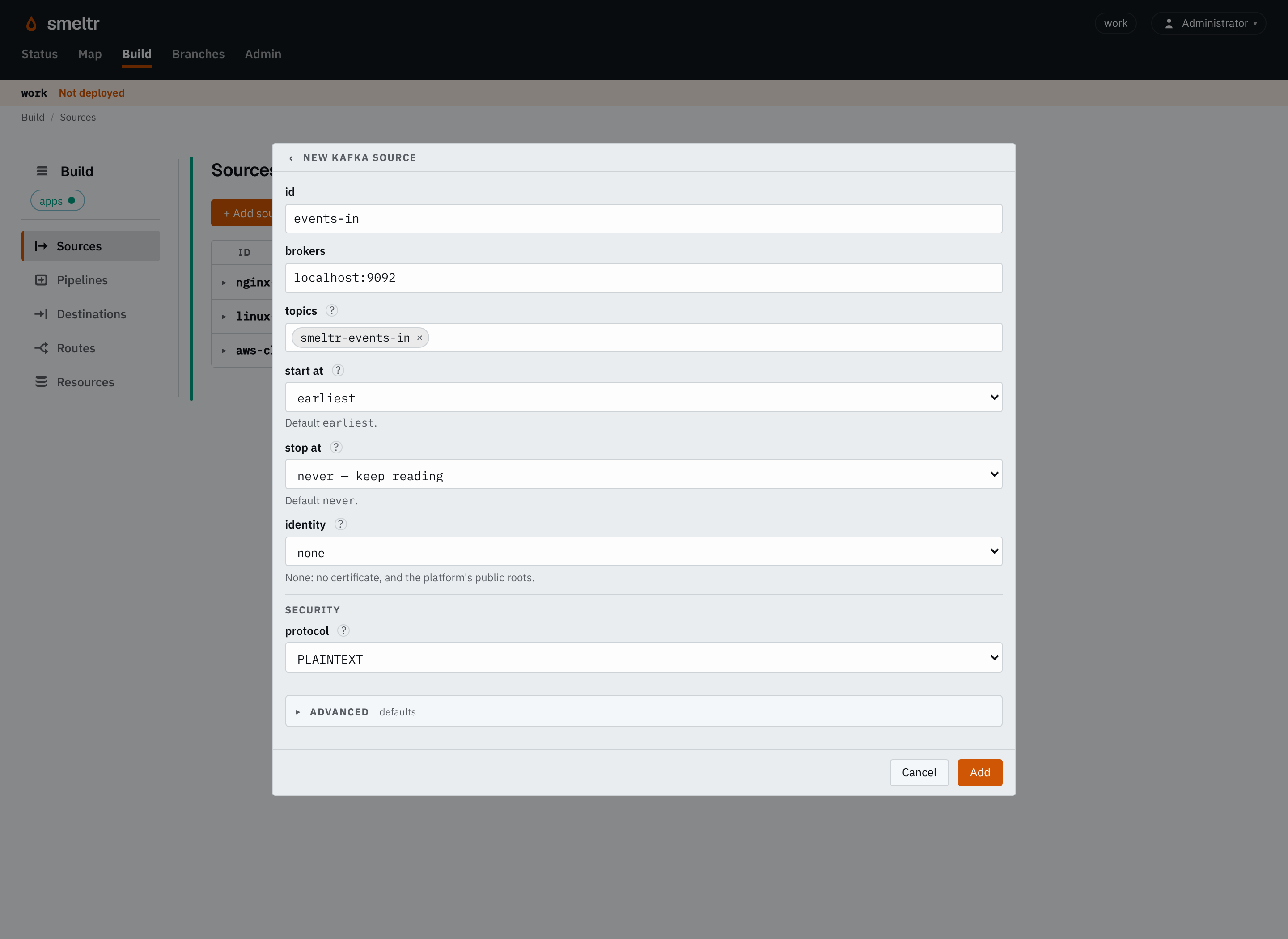
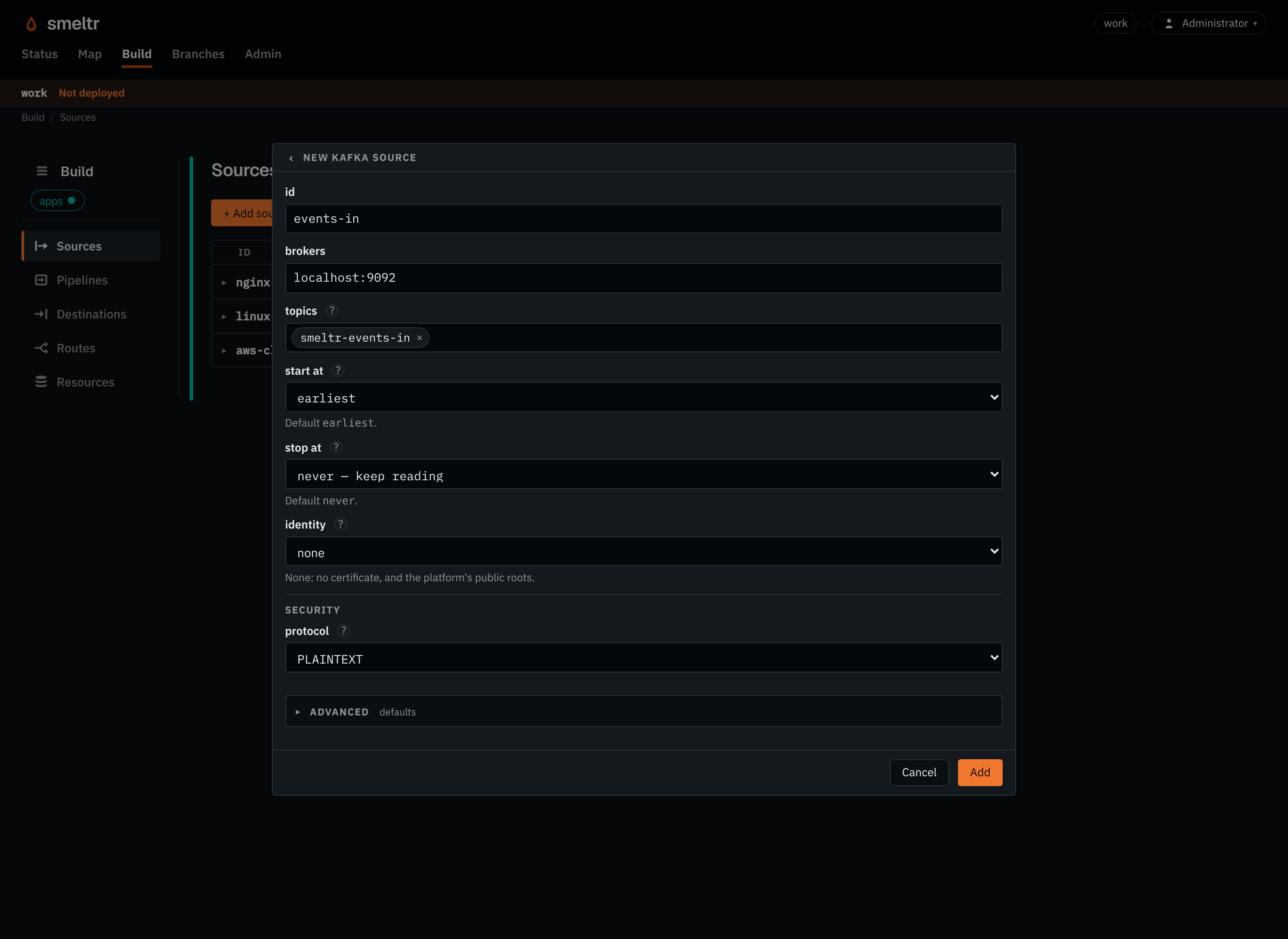
Reads UTF-8 records from a plaintext test broker. Replace localhost:9092 with an address
reachable from the worker; localhost means the worker's own host.
{
  "id": "events-in",
  "type": "kafka",
  "brokers": "localhost:9092",
  "topics": [
    "smeltr-events-in"
  ],
  "encoding": "utf-8"
}
Before you start
- Create the input topic.
- Leave the group id blank unless this source needs offsets of its own. Blank reads as its
worker group's consumer group,
smeltr.<worker group>, so every worker group reads every record and rebalances only among its own workers. The leader refuses two sources that read one topic in one consumer group on the same brokers. - Allow workers to reach the initial broker addresses you enter and every broker address Kafka returns when they connect.
- Give the Kafka account permission to read the topics and use the consumer group.
- For an authenticated broker, configure Kafka security. Select a connection identity for a private CA or a client certificate.
Settings
It also takes the settings every source takes.
brokers string required
The brokers a worker first connects to, host:port, separated by commas.
kafka-1:9092,kafka-2:9092kafka.example.com:909310.0.1.15:9092,10.0.2.15:9092,10.0.3.15:9092topics list of strings required
The topics to read. One that starts with ^ is a regular expression: it reads every topic whose whole name matches it, including topics created later, which are read within 30 seconds. A matching topic that another source already reads in the same group is left to that source.
ordersorderspaymentsrefunds^orders-.*start position default {"type": "earliest"}
Where this source reads from. Changing it will move offsets to the new position.
earliest- Reads from the oldest record each partition holds.
latest- Reads only what is written after it starts.
timestamp- Reads from the first record at or after
millis, in milliseconds since the Unix epoch.
stop position default never
When to stop reading. Absent, never stops.
timestamp- Stops at the first record at or after
millis, in milliseconds since the Unix epoch.
format string default each payload is text, in _raw
How each payload becomes the record.
avro- Reads Avro messages using the schema registry. Fields you don't declare are kept.
schemaRegistry object default none
The schema registry that holds your Avro schemas. Set url. If the registry needs a sign-in, also set username and password. Needed for format avro.
{"url": "https://registry.example.com"}{"url": "https://registry.example.com","username": "smeltr","password": {"secret": "registry","version": 1}}fields list of fields default none
The Avro fields to read, each with a name and a type such as i64 or str. Name a nested field with dots, such as user.id. Top-level fields you don't list are kept. Only with format avro.
[{"name": "user_id","type": "i64"},{"name": "user.name","type": "str"}]identity identity default none
The connection identity it connects under, for a private CA or a client certificate. Without one, no certificate is offered and the public roots, Mozilla's and the host's, are trusted.
kafka-clientkafka-mtlsAdvanced
groupId string default smeltr.<worker group>
The consumer group. Readers in one group share the work and resume from the group's saved positions. Set one only when this source needs positions of its own. The leader refuses two sources that read one topic in one consumer group on the same brokers.
smeltr-replayfetchBytes size default 64 MiB
How much fetched input may wait in memory before it is processed. 4 MiB to 512 MiB.
128 MiB16 MiB256 MBencoding string default auto
How a record's bytes become _raw's text: auto, none, or a WHATWG encoding label other than the replacement ones, such as utf-8, utf-16le or shift_jis.
auto- Detects each record's encoding.
utf-8- Decodes every record as UTF-8, as any other label decodes as its own encoding. Bytes that do not decode become U+FFFD.
none- Decodes nothing: the record has no
_raw, and its payload is__source.bytesalone. A pipeline reads it as text withdecode(__source.bytes, encoding).
properties map default none
Other Kafka client properties, each name to its value. See Kafka security. A property Smeltr sets itself, such as bootstrap.servers, is refused, and a secret one belongs in credentials.
security.protocol = SASL_SSLsecurity.protocol = SASL_SSLsasl.mechanism = SCRAM-SHA-512sasl.username = smeltrcredentials map default none
Kafka client properties whose values are secret, each name to the credential holding its value.
sasl.password = KAFKA_PASSWORDsasl.oauthbearer.client.secret = KAFKA_OAUTH_CLIENT_SECRETFields it gives
| Field | Type | Holds |
|---|---|---|
__source.name | str | The name of the source that read the record. |
__source.type | str | The kind of source that read it, its type, such as kafka, s3List, httpApi or hecReceiver. |
__source.topic | str | The Kafka topic, or event hub, the record came from. A metrics record carries __smeltr_metrics and a logs record __smeltr_logs. |
__source.partition | i64 | The Kafka or Event Hubs partition the record came from. |
__source.offset | i64 | The record's offset in its Kafka or Event Hubs partition, or its record number in its object, from 0. |
__source.time | datetime | The time a sender gave the event, null otherwise. |
__source.headers | variant | The Kafka record's headers, each key to its value as text. A key the record repeats holds its last value, and a header with no value is not there. Read one as text with __source.headers.trace as str. |
__source.bytes | bytes | The record's payload as the source read it, before any decoding. The source decodes _raw from it. A bytes destination writes it unless the destination names another field. Text functions refuse it; decode(__source.bytes, encoding) reads it as text. |
Where it starts and stops
start and stop apply to each partition of every topic the source reads.
The group's workers share the partitions, whatever the start and the stop.
- Start. Where the source reads from: beginning, end, or a specific time.
- Stop. When to stop reading: never, or a specific time. Once every partition has reached it, the source waits, idle, until it is changed.
- Progress is saved and restarted sources continue from where they left off.
To read the topics as a stream, leave both out. To read between 4 and 8 AM yesterday, start at 4 AM and stop at 8 AM.
Moving a source
To reread or skip records, change start and deploy. Each partition moves there once,
then reads on.
- Setting the same
startagain moves nothing. - Rolling back a deploy does not move the source back.
How it works
Smeltr manages the consumer's commits. The extra properties refuse Kafka settings Smeltr sets itself, such as auto-commit.
Verify
Produce a record you can recognize to the input topic, then find it at the destination. The tutorial's delivery check shows the commands.
Troubleshooting
- Kafka connects, then times out
- Check the brokers' advertised addresses from the worker host, plus DNS, firewall rules and TLS names.
- Authentication or authorization fails
- Check the security protocol, mechanism, secret availability, and topic and group permissions. See Kafka security.
- Old records do not replay
- Check the group's saved positions and the topic's retention. To read old records again, move the source.