Okta System Log
Reads an Okta org's System Log, every event once, in the order Okta stored it.
The source polls Okta's System Log API.
Example
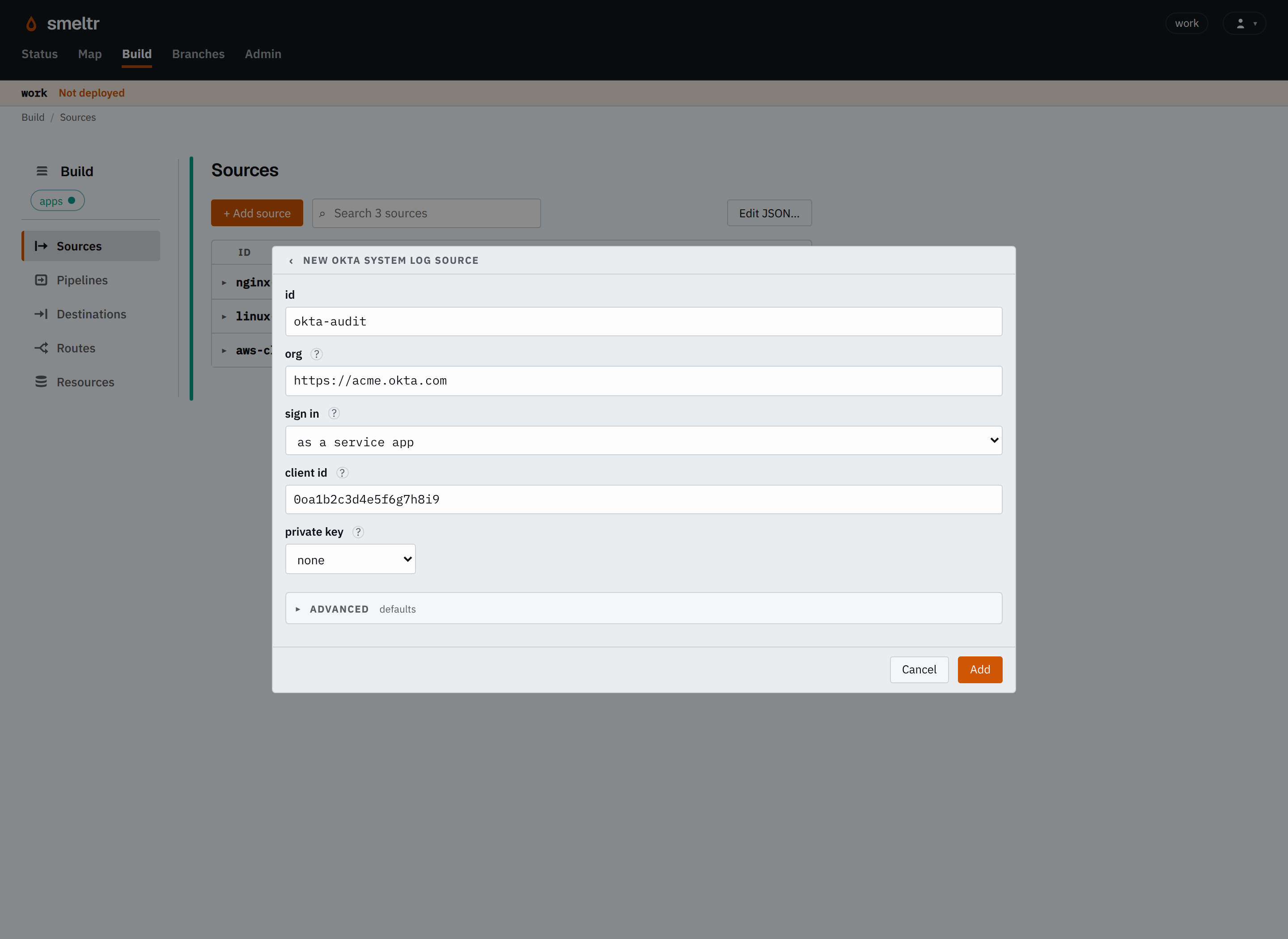
Reads the System Log of acme.okta.com. The source signs in as the service app 0oa1b2c3d4e5f6g7h8i9 and reads its private key from the worker-host variable OKTA_PRIVATE_KEY.
{
  "id": "okta-audit",
  "type": "oktaLogs",
  "org": "https://acme.okta.com",
  "clientId": "0oa1b2c3d4e5f6g7h8i9",
  "privateKey": "OKTA_PRIVATE_KEY"
}
The same source, signing in with an API token instead:
{
  "id": "okta-audit",
  "type": "oktaLogs",
  "org": "https://acme.okta.com",
  "token": "OKTA_TOKEN"
}
How it signs in
The source signs in to Okta as a service app or with an API token. For a service app, set clientId and privateKey; for an API token, set token.
| Service app | API token | |
|---|---|---|
| Settings | clientId, privateKey, and keyId when the app has several
active keys | token |
| Acts as | The app, with only the scope and role you grant it | The admin who created the token, with all of that admin's rights |
Use a service app. Recommended because it keeps working after the person who set it up leaves. Use an API token for quick tests.
Set up a service app
Create an API Services app as Okta's service app guide describes, with:
- Public key / private key client authentication, with DPoP on or off.
- The
okta.logs.readscope. - The Read-only Administrator role.
Copy its client ID into clientId, put its active private key in a credential named in privateKey, and set keyId when the app has more than one active key.
The source takes an RSA key in PKCS#8 PEM, which begins -----BEGIN PRIVATE KEY-----. If your key begins -----BEGIN RSA PRIVATE KEY-----, convert it first:
openssl pkcs8 -topk8 -nocrypt -in key.pem -out key-pkcs8.pemSet up an API token
Create an API token as Okta's API token guide describes, signed in as an admin who can read the System Log, such as a Read-only Administrator. Put
it in a credential and name it in token.
Settings
Set org to the address your users sign in at, such as https://acme.okta.com, or to the org's custom domain. The source also takes the
settings every source takes.
org string required
The org's address, with no path. It sends the token only over https://, or to this host.
https://acme.okta.comhttps://login.acme.comtoken credential default the service app's sign-in
The credential holding an Okta API token that can read the System Log. It is sent as Authorization: SSWS <token>. Give a token, or clientId and privateKey, never both.
OKTA_TOKEN{"secret": "okta-token","version": 1}clientId string default none
The client id of a service app granted the okta.logs.read scope and the Read-only Administrator role. The source signs in as the app with a signed key assertion and reads with a token bound to the source's own key by DPoP when Okta binds it. Set both clientId and privateKey, or neither.
0oa1b2c3d4e5f6g7h8i9privateKey credential default none
The credential holding the service app's private key, an RSA key as PEM PKCS#8 (BEGIN PRIVATE KEY), whose public half the app holds.
OKTA_PRIVATE_KEY{"secret": "okta-key","version": 1}Advanced
keyId string default none
The kid naming privateKey, for a service app with several keys.
k1identity identity default none
The connection identity it connects under, for a proxy's private CA.
okta-clientcorp-proxystart string default everything
What its first poll asks for.
everything- Asks from what Okta lists with no start: its last seven days.
new- Asks from the first poll's start.
pollIntervalSecs integer default 60
Seconds from the start of one poll to the start of the next. At least 1. A rate limit is waited out until the reset Okta names.
3060Fields it gives
Each record is one event, exactly as Okta sends it. __source.url holds the address of
the page the source read it from.
| Field | Type | Holds |
|---|---|---|
__source.name | str | The name of the source that read the record. |
__source.type | str | The kind of source that read it, its type, such as kafka, s3List, httpApi or hecReceiver. |
__source.url | str | The address of the page an API source read the record from. |
__source.bytes | bytes | The record's payload as the source read it, before any decoding. The source decodes _raw from it. A bytes destination writes it unless the destination names another field. Text functions refuse it; decode(__source.bytes, encoding) reads it as text. |
Where it starts
The first poll asks for the last seven days of events. With start set to new, it asks only for events from the first poll onward. After that, the source
resumes at the last page every destination took, so a restarted worker neither skips nor repeats
events, and changing start does not replay anything. The source keeps reading until you
remove it.
How it works
One worker of the group holds the source. Each poll asks the System Log API for events in
ascending order and follows Okta's next links until a page holds nothing new, then waits pollIntervalSecs from the poll's start. When the source reaches Okta's rate limit, it
waits until the reset time Okta names.
As a service app, the source signs a key assertion with privateKey and asks the
org's token endpoint, /oauth2/v1/token, for a token for the okta.logs.read scope. The source makes its own DPoP key when it starts, and proves each
request with it when the app requires DPoP. The source renews the token shortly before it expires,
and signs in again when Okta refuses a token it has already used.
The source follows no redirects, because it sends its credentials with every request.
Verify
Sign in to the org, then look at the destination for an event with eventType user.session.start. It arrives within a poll interval after Okta lists it.
Troubleshooting
The worker log shows Okta's answer, followed by what to check.
- The client_assertion signature is invalid
- The app holds no active key that matches
privateKey. Check that the app holds the key's public half and that the key is Active. - kid is invalid
- The app has several active keys. Set
keyIdto the key's KID, or deactivate the other keys. - Refused the credentials (403), E0000006
- Check that the app, or the token's admin, has the Read-only Administrator role.
- Refused the sign-in (400), invalid_scope
- Check that the app has the
okta.logs.readscope. - Refused the sign-in (302)
orgnames the-adminaddress. Remove-adminfrom it.- The private key is not PKCS#8
- Convert it with
openssl pkcs8 -topk8 -nocrypt, as shown above. - Refused the credentials (401) with an API token
- Okta no longer accepts the token. Create a new token, or switch to a service app.