MySQL and MariaDB
Runs a query you write against a MySQL or MariaDB database every poll, and reads each row of its result as one record.
Use it for what an application keeps in its own tables, such as an audit table or a sign-in history. The source reads only what your query returns, and its mode decides which of those rows are new. One source kind serves both servers.
Example
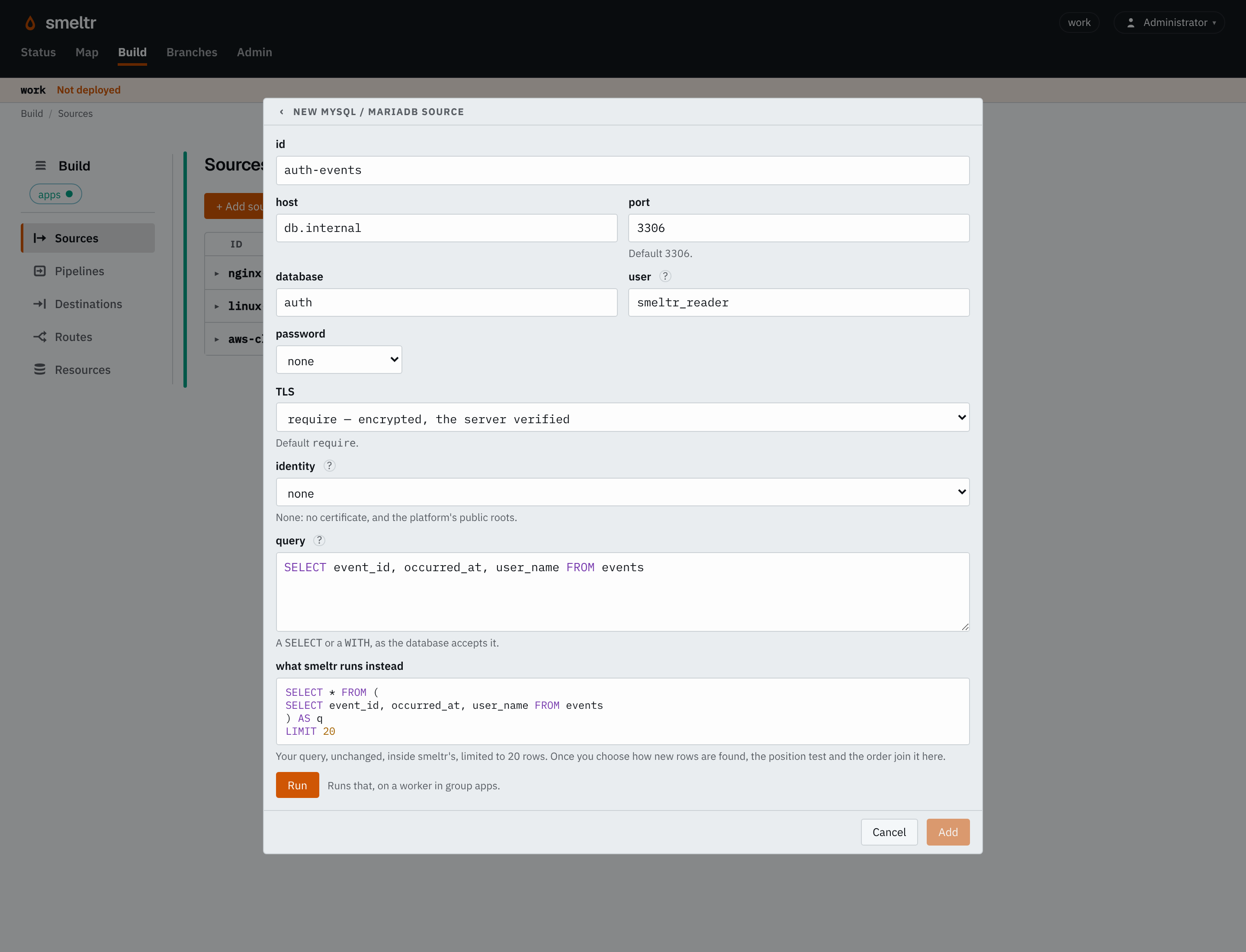
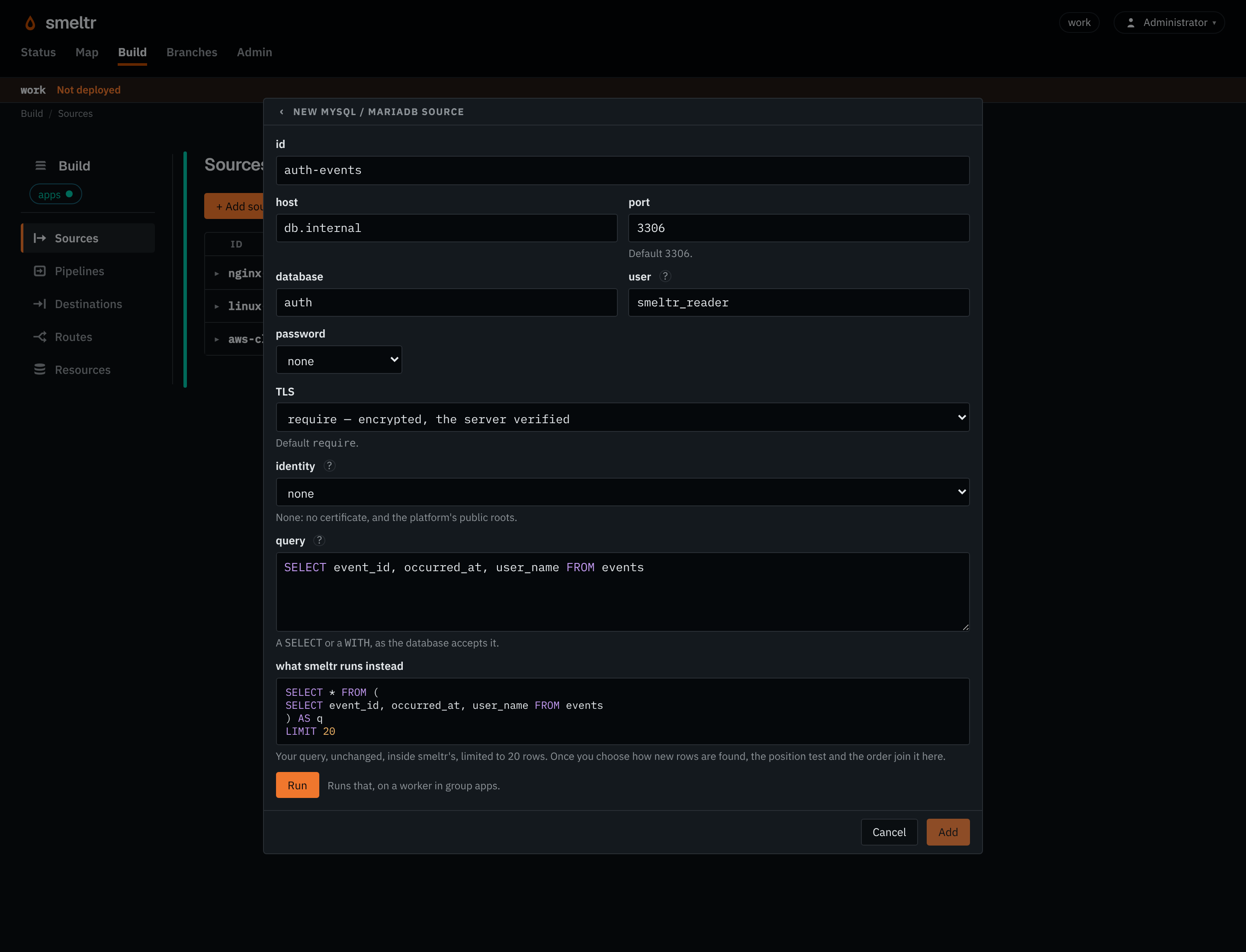
Reads the table events in the database auth on db.internal, as the user smeltr_reader, whose password is in the
worker-host variable MYSQL_PASSWORD. It begins at the largest event_id on its first poll, and each poll reads the rows whose event_id is past the last one
sent.
{
  "id": "auth-events",
  "type": "mysql",
  "host": "db.internal",
  "database": "auth",
  "user": "smeltr_reader",
  "password": "MYSQL_PASSWORD",
  "query": "SELECT event_id, occurred_at, user_name FROM events",
  "mode": {
    "type": "incrementing",
    "position": [
      "event_id"
    ]
  },
  "fields": [
    {
      "name": "event_id",
      "type": "i64"
    },
    {
      "name": "occurred_at",
      "type": "datetime"
    },
    {
      "name": "user_name",
      "type": "str"
    }
  ]
}
Before you start
- Create a user that can connect from the workers' addresses and read the tables the query reads, and nothing more. See CREATE USER and GRANT for MySQL, or CREATE USER and GRANT for MariaDB.
- Allow workers to reach the server's port.
- With
tlsrequire, the default, the server needs encrypted connections on, with a certificate that nameshost. See MySQL: Using encrypted connections or MariaDB: Secure connections overview. For a certificate from a private authority, give the source a connection identity that trusts it. - Put the password in a credential.
- For Incrementing or Updated at, index the first field of
position, so each poll reads only the new rows. See CREATE INDEX.
Settings
The form on the Sources page asks for the connection first, then the query. Its Run button runs the query on a worker of the group and shows the rows it read, so you choose the mode and the fields from the real result. The source also takes the settings every source takes.
host string required
The database server's host name or address.
db.internal10.4.0.12database string required
The database the query runs in.
authshopuser string required
The user it connects as. Give it read access and nothing more: the query runs in a read-only transaction, but only the user's own grants keep a source from writing.
smeltr_readerpassword credential default none, for a server that asks for no password
The credential holding the user's password.
MYSQL_PASSWORD{"secret": "auth-db-reader","version": 1}query string required
A SELECT or a WITH, with no ORDER BY or LIMIT of its own: the statement around it orders by the position and sets the batch. :last.<field> is the value that field held in the last row sent, NULL before the first, for a filter the statement's own cannot reach, such as one inside a GROUP BY. The statement still reads past the last row sent, so the filter keeps the last value (>=) and rows sharing it are not lost.
SELECT event_id, occurred_at, user_name FROM auth.eventsSELECT event_id, occurred_at, user_name FROM auth.events WHERE (:last.occurred_at IS NULL OR occurred_at >= :last.occurred_at)mode mode required
How it knows a row is due. position is the field rows are read in the order of, then the fields that tell apart rows with the same value in it. A position that starts with a datetime waits settleSecs (default 30) behind the database's clock for late commits. A source with no progress begins where start says: "now" (default) at the largest position the query returns on its first poll, "beginning" at every row, or "from" at startFrom, an integer or an ISO 8601 time with its offset.
incrementing- Each row once, by a field that only grows as rows are added: an id, or the time it was inserted. Reads only the new rows.
updatedAt- Each row when it is added and again each time it changes, by a datetime every insert and update sets. A deleted row is not seen.
comparing- Each row when its
keyis new or its values changed, by reading the whole result every poll. Up to a million rows; the leader keeps an entry for each. everyPoll- The whole result every poll. Nothing is remembered.
fields list of fields required
Each field of the record: the result column of the same name, and its type as a pipeline spells one, such as i64, datetime, str, bytes or array<str>. A column the fields do not name is not read.
[{"name": "event_id","type": "i64"},{"name": "occurred_at","type": "datetime"},{"name": "user_name","type": "str"}]Advanced
port integer default 3306
The server's port.
33076033tls string default require
Whether the connection is encrypted.
require- Encrypts, and verifies the server's certificate and its name.
disable- Sends everything in the clear, the password too.
identity identity default none
The connection identity it connects under: the authorities it trusts for the server's certificate, and a certificate to present. Only with tls require.
auth-db-clientcorp-capollIntervalSecs integer default 60
Seconds from the start of one poll to the start of the next. At least 1. A poll that reads a full batch reads the next at once.
30300batch integer default 5000
The most rows one poll reads by a position. With no field after the first in position, a full poll leaves its last rows sharing one value to the next, which reads up to twice batch when they fill a poll; past that, the rest of the rows sharing that value are skipped with a warning. In everyPoll, a result with more fails the poll. Between 1 and 100000.
100020000Fields it gives
Each record is one row. It holds a field for each entry of fields, read from the
result column of the same name and held as the type the entry declares. A column no entry names
is not read.
| Field | Type | Holds |
|---|---|---|
__source.name | str | The name of the source that read the record. |
__source.type | str | The kind of source that read it, its type, such as kafka, s3List, httpApi or hecReceiver. |
__source.database | str | The database an SQL source read the record from, as host:port/database. |
How it finds new rows
mode says which rows a poll sends. The form lists the modes cheapest first, and
suggests one from the result of Run.
- Incrementing
- Sends each row once.
positionnames a field whose value only grows as rows are added, such as an id or the time a row was inserted. Each poll reads the rows past the last row sent, in the order ofposition. A row added later with a smaller value than one already sent is never read. - Updated at
- Sends each row when it is added and again each time it changes.
positionstarts with a datetime that every insert and every update sets. A deleted row sends nothing. - Comparing
- Sends each row whose
keyis new, or whose fields changed since the last poll. Each poll reads the whole result, up to 1,000,000 rows, and the leader keeps a hash of each row. Use it for a table with no column that grows, such as a list of accounts. A deleted row sends nothing; a row whose key comes back is sent again. - Every poll
- Sends the whole result on every poll, and remembers nothing. Use it for a small table read as a whole, such as current settings.
In position, the fields after the first tell apart rows that share a value in it,
such as an id after a time. When many rows share one time, add such a field. Without one, a poll
that fills batch leaves its last rows sharing one value to the next poll, which
reads up to twice batch. Past that, the rest of the rows sharing the value are
skipped, and the worker log says so.
A position that starts with a datetime reads only rows at least settleSecs behind
the database's clock. A transaction that commits after a later one is then still read, as long
as it commits within settleSecs. Rows arrive that much later.
:last.<field> in the query is the value that field held in the last row sent,
and NULL before the first. Use it to filter where the statement's own test cannot
reach, such as inside a GROUP BY. Keep rows with the last value (>=, not >), because rows sharing it may not all have been sent.
Column types
Run suggests each field's type from its column's type. A column of a type not listed here, such as a geometry, is read as its text.
| MySQL or MariaDB type | Field type |
|---|---|
tinyint(1), boolean | bool |
tinyint, smallint, mediumint, int, bigint, year, bit | i64 |
float, double | f64 |
char, varchar, text, decimal, enum, set | str |
date, datetime, timestamp | datetime |
time | duration |
json on MySQL | variant |
binary, varbinary, blob | bytes |
A decimal is read as its exact decimal text. A zero date, such as 0000-00-00, is read as null. A MariaDB json column reads as str. A tinyint(1) that holds other than 0 or 1 needs an i64 field, not bool. An unsigned bigint or bit(64) past
9223372036854775807 is read as its decimal text, so it needs a str field.
Where it starts
A source in Incrementing or Updated at with no progress begins where start says:
now, the default: at the largest position the query returns on its first poll. It sends the rows that hold that value, then the rows added after them.beginning: every row the query returns.from: the rows whose position is at or paststartFrom.
Comparing sends every row on its first poll. After that, the leader keeps how far every
destination has taken, and a restarted worker, or another worker that takes the source over,
resumes there. It may send a row twice and never skips one. Changing the connection's host, port
or database, the query, the mode, or the fields of position or key starts the source afresh from start. The other settings keep its progress. The
source keeps reading until you remove it.
How it works
One worker of the group holds the source. Each poll runs your query inside a statement of Smeltr's own, which adds the position test, the order and the batch limit. After the example's first row, each of its polls runs:
SELECT * FROM (
SELECT event_id, occurred_at, user_name FROM events
) AS q
WHERE q.`event_id` > ?
ORDER BY q.`event_id`
LIMIT 5000
The form shows the exact statement for your settings under what smeltr runs instead. The query is one SELECT or WITH, with no ORDER BY, LIMIT or placeholders of its own. The source runs the statement in a read-only
transaction, with the session's time zone set to UTC, and reads a time without a zone as UTC.
The settle test compares with NOW(6), the database's own clock.
A poll that fills batch reads the next at once. Otherwise the next poll starts pollIntervalSecs after this one. When Run checks a poll's plan and
finds that each poll would read a whole table of more than about 100,000 rows, the form warns.
Index the first field of position, or filter inside the query with :last.<field>.
A poll's result may hold up to 256 MiB. The source has the database stop a statement after 290 seconds, or sooner if the database's own limit is shorter, and drops a connection that has not answered in 300. After a failure, the source asks again after one second, then waits twice as long each time, up to five minutes. It opens a new connection after one breaks.
Verify
- In the form, choose Run. It shows the first rows the query returns, the record the pipeline sees for the first, and, once you choose a position, whether a poll reads through an index.
- Once the source is deployed, add a row the query returns. It reaches the destination within
pollIntervalSecs, plussettleSecsfor a datetime position. On the Sources page, the worker column names the worker that holds the source.
Troubleshooting
The form shows what the MySQL or MariaDB server answered to Run, and the worker log shows it for a poll.
- The MySQL password is in …, which this worker does not have
- The credential is not on the worker that holds the source. See Credentials.
- Run fails with a refusal to read a table
- Grant the user
SELECTon the table. - The result has no column
x, which the record declares - An entry of
fieldsnames a column the query does not return. Rename the entry, or give the column that name withASin the query. - The result has two columns named
x - Give one of them another name with
ASin the query. - Each poll scans all of a table
- The database reads the whole table on each poll to find the new rows. Index the first field of
position, or filter inside the query with:last.<field>. - More rows share one position value than twice the batch
- Add a field to
positionthat tells those rows apart, such as an id, or raisebatch. - Two rows have the key …
- In Comparing,
keymust be unique in the result. Add fields tokeyuntil it is. - Every poll reads at most … rows
- In Every poll, the result holds more rows than
batch. Raisebatch, up to 100,000, or choose another mode. - This poll's result holds more than 256 MiB
- Lower
batch, or read fewer or narrower fields. - The position's first column is of a type smeltr reads only as text
- Cast the column in the query to a type in the table under Column types.